
 eronadmin
Introduction: Unleashing the Power of Your MongoDB Data
Welcome to the deep end of MongoDB data processing! If you’ve ever needed to go beyond simple find() queries—if you’ve ever needed to calculate averages, generate complex reports, or join data from different collections—then you need the MongoDB Aggregation Framework.
This powerful tool is the workhorse of data analysis in the NoSQL world, providing a flexible, multi-stage Aggregation Pipeline to transform and compute data directly within the database. Forget fetching massive datasets to your application server for manual processing; the Aggregation Framework does the heavy lifting, giving you efficient, real-time results.
MongoDB Aggregation Framework is one of the most powerful features of MongoDB. It allows developers to process, transform, and analyze data directly inside the database. In real‑world applications such as e‑commerce, HR systems, analytics dashboards, and fintech platforms, aggregation plays a critical role in generating meaningful insights from large datasets.
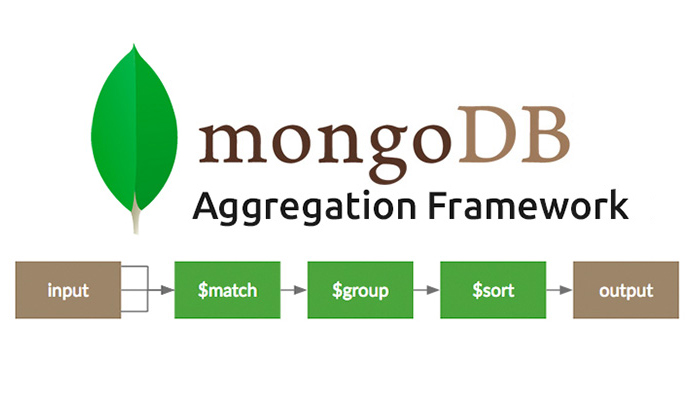
Understanding the MongoDB Aggregation Pipeline
The Aggregation Framework is built on the concept of a pipeline, where documents pass through a series of stages. Each stage performs an operation, and the output of one stage serves as the input for the next.
| Stage Operator | Purpose | Real World Applications |
| $match | Filters documents based on specified criteria. Always use this first for performance! | Find all orders placed in the last 30 days. |
| $group | Groups documents by a specified key and performs aggregate calculations (sum, average, count). | Calculate the total sales revenue per region. |
$project | Selects, reshapes, and renames fields, or computes new ones. | Display only the name and total_sales fields in the final report. |
| $unwind | Deconstructs an array field from the input documents to output a document for each element. | Process individual line items within an order document. |
| $lookup | Performs a left outer join to an unsharded collection in the same database. | PLink orders to customer details for a full report. |
Why Aggregation is Important in Real‑Time Applications
In live systems, data changes frequently. Aggregation helps in generating reports, dashboards, summaries, and analytics without moving data to external tools.
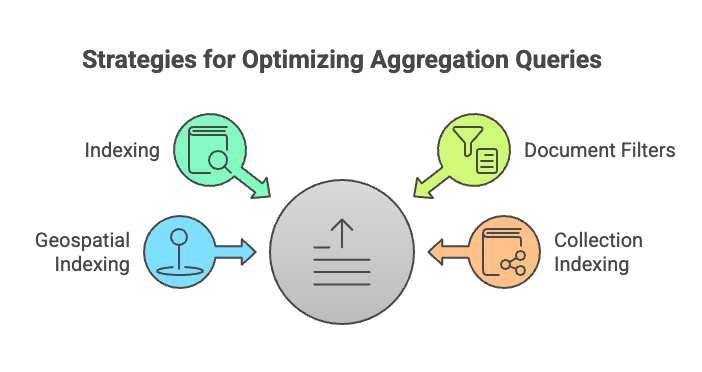
Real‑World Use Case 1: E‑Commerce Sales Dashboard
Scenario: An online shopping platform wants to display daily sales revenue in real time.
Sample Collection: orders
{
“_id”: 1,
“orderDate”: ISODate(“2025-01-10”),
“totalAmount”: 2500,
“status”: “completed”
}
Aggregation Query:
db.orders.aggregate([
{ $match: { status: “completed” } },
{
$group: {
_id: { $dayOfMonth: “$orderDate” },
dailyRevenue: { $sum: “$totalAmount” }
}
}
])
Real‑time Connection: This aggregation can be connected to a live admin dashboard using Node.js or Laravel APIs to show daily revenue updates instantly.
Real‑World Use Case 2: HR Attendance Monitoring System
Scenario: A company wants to calculate total working hours of employees per day.
Sample Collection: attendance
{
“employeeId”: “EMP101”,
“checkIn”: ISODate(“2025-01-10T09:00:00”),
“checkOut”: ISODate(“2025-01-10T18:00:00”)
}
Aggregation Query:
db.attendance.aggregate([
{
$project: {
employeeId: 1,
workingHours: {
$divide: [
{ $subtract: [“$checkOut”, “$checkIn”] },
1000 * 60 * 60
]
}
}
}
])
Real‑time Connection: This logic can be integrated with biometric or face‑recognition systems to calculate employee work hours instantly.
Real‑World Use Case 3: Banking & FinTech Fraud Detection
Scenario: Detect users with unusually high transaction amounts in real time.
Aggregation Query:
db.transactions.aggregate([
{
$group: {
_id: “$userId”,
totalAmount: { $sum: “$amount” }
}
},
{
$match: {
totalAmount: { $gt: 100000 }
}
}
])
Real‑time Connection: Aggregation pipelines can trigger alerts or flags when suspicious behavior is detected.
Conclusion: Mastering the MongoDB Aggregation Framework
The MongoDB Aggregation Framework is more than just a querying tool; it’s an integrated, scalable platform for real-time analytics and complex data transformation. By mastering stages like $match, $group, and $lookup, you can perform intricate data analysis—from sales reporting to user behavior metrics—directly within your database.
Reference Links
1. https://www.mongodb.com/docs/manual/core/aggregation-pipeline/
2. https://learn.microsoft.com/en-us/azure/cosmos-db/mongodb/tutorial-aggregation
3. https://www.mongodb.com/docs/compass/create-agg-pipeline/